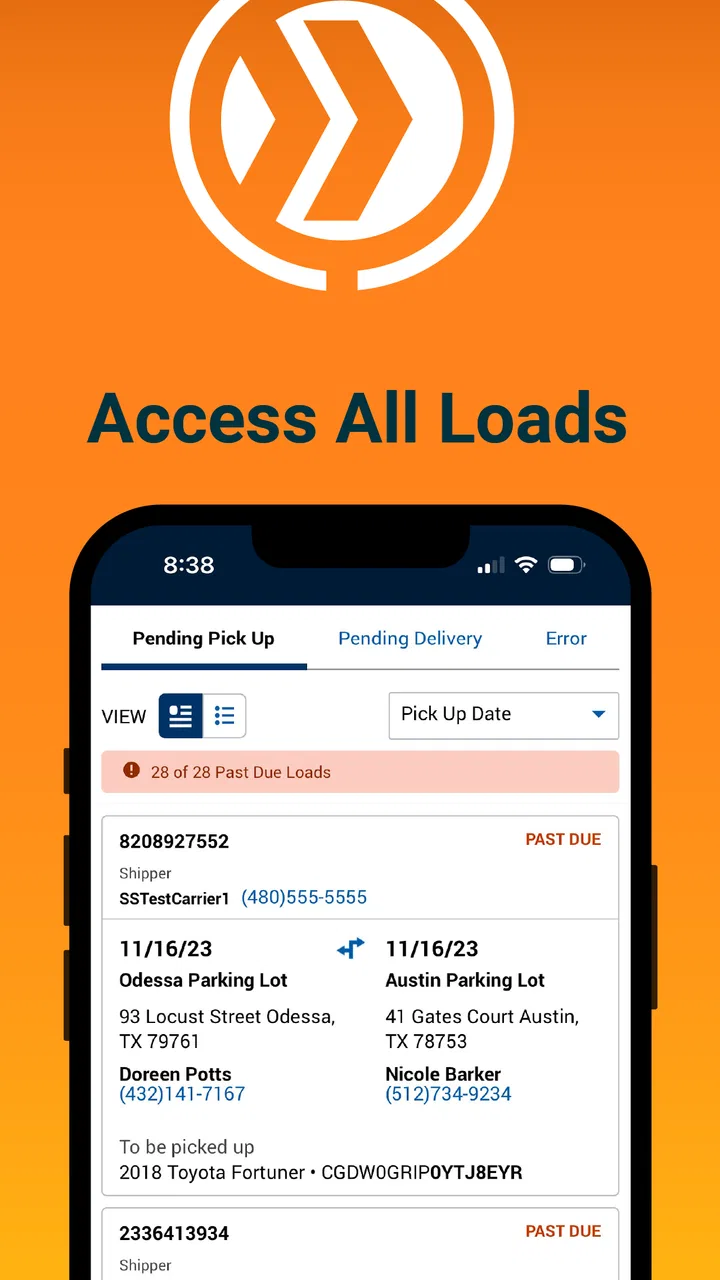
CentralDispatch Carrier Hub
- 3.8
- Rating
- 10.00K
- Installs
- Free
- Price

 Analysis by App-foxy
CentralDispatch Carrier Hub is a focused Auto & Vehicles app from Cox Automotive, Inc. I see it as a practical companion for people who already work with Central Dispatch and need an inspection tool close at hand, rather than as a general driving or vehicle-maintenance app. Its purpose is narrow, and that is actually its main appeal: it is built around checking vehicle-transport details instead of trying to become a complete logistics suite.
After spending time with it, my impression is that the app makes the most sense inside a repeatable carrier workflow. You open it when an inspection task needs attention, review the relevant information, and use the result to support the next step in the transport process. That sounds simple, but a narrowly defined tool can save time when it is used at the right point in the day. The real benefit is less about browsing and more about reducing the distance between a vehicle check and the work that follows.
The app is free, carries an Everyone age rating, and is available for devices running Android 8.0 or later. Its current version is 47.0.0, and it has passed the ten-thousand-install mark. The average rating sits at 3.3 from just over one hundred ratings, with several dozen written reviews. Those figures suggest a useful but not universally smooth experience: enough people are using it to make the app relevant, while the middling score is a good reason to approach it as a work tool that may require some patience.
You May Also Like

 Blood Strike: 2.5 Anniversary
Blood Strike’s Loadouts Turn Every Drop Into a Tactical Gamble
A close look at Blood Strike’s custom loadouts: how fast access to signature weapons reshapes its battle royale rhythm, rewards preparation, and narrows the gap between fights.

 Pandora - Music & Podcasts
Pandora’s Music Is Easy to Start, but Harder to Recover
Pandora’s strength is its low-effort path from a seed to a station. Its weak spot is how much confidence it asks you to place in connection, setup, and quiet recovery.

 8 Ball Pool
 Is Built on Rivalries, Rematches, and Routine
A close look at the rivalries, rematches, shared routines, and unanswered safety questions that turn a quick pool match into a persistent mobile community.

 Samsung Music
’s Quiet Strength Is Playing What You Already Own
Its reach comes less from spectacle than from dependable access to a personal library. That simplicity is both the app’s strongest retention engine and its ceiling.

 AccuWeather: Weather Radar
AccuWeather Review: A Quick, Clear Forecast for Everyday Decisions
For everyday plans, the best forecast is the one you can understand quickly. AccuWeather makes rain timing, radar, and local conditions easy to act on, with a few trade-offs.

 Hill Climb Racing
Why Hill Climb Racing Still Turns Crashes Into One More Run
A tiny car, a bumpy hill and one more upgrade: Hill Climb Racing keeps resurfacing because its simple chaos makes every near-miss feel personal.
More From Our News Desk
View All News


How I would build a reliable inspection routine
I would not treat CentralDispatch Carrier Hub as an app to leave open casually throughout the day. It works better as one part of a defined routine. Before starting a pickup or delivery, I would first make sure the phone has a stable connection, the correct account session is available, and the vehicle information I need is easy to identify. That preparation matters because an inspection tool is only helpful when it supports a decision at the moment the vehicle is being handled.
A sensible baseline is to use the app at a consistent checkpoint rather than opening it randomly. For example, a carrier could review the assigned vehicle before loading, complete the inspection while the vehicle is accessible, and then check the result again before moving on to the next job. Keeping those moments consistent makes it easier to notice omissions. It also prevents the common mistake of trying to reconstruct the vehicle’s condition from memory later.
In an everyday scenario, imagine arriving at a dealership with several vehicles waiting. Instead of mixing notes from different cars, I would finish one inspection before moving to the next, keeping the phone focused on that vehicle until the check is complete. I would then confirm that the information corresponds to the right job before starting another inspection. This habit is more valuable than it sounds because busy lots create plenty of opportunities to confuse similar vehicles, especially when several keys, stock references, or transport assignments are being handled at once.
The app’s narrow role also helps define what it should not replace. I would still use the established Central Dispatch workflow for broader dispatch work and keep any company-required records in their proper place. Carrier Hub is best viewed as an inspection-focused layer, not a universal replacement for every tool a professional carrier may use. That distinction prevents disappointment and makes the app easier to fit into an existing operation.
Small preparation habits that prevent larger mistakes
One useful habit is to inspect the phone before arriving at the vehicle. A nearly full battery, a dirty camera lens if the workflow involves visual checking, or an unreliable connection can turn a short task into a delay. I would also avoid beginning an inspection while carrying several unrelated tasks in my head. The app is most effective when the inspection is treated as a discrete job with a clear start and finish.
Another practical habit is to keep the order of checks consistent. Even if the app presents the task clearly, my own sequence should remain stable: identify the vehicle, review the available inspection information, examine the vehicle carefully, and only then move to the next assignment. A repeatable sequence is especially useful for newer drivers or anyone covering a route outside their normal routine.
I would also make a quick confirmation before submitting or leaving an inspection screen. This is not glamorous advice, but it addresses one of the biggest risks in mobile logistics: completing the work on the wrong record or leaving a task half-finished because attention shifted to a phone call, a gate attendant, or the next vehicle. The app cannot remove those real-world interruptions, so the user’s final check remains important.
Settings and phone choices worth checking
There are no reasons to overcomplicate the device setup for this app. I would begin with the phone’s notification behavior, battery restrictions, and connection settings. If Android is aggressively limiting background activity, the app may feel less dependable when switching between it and another work application. I would not assume that changing every battery option will improve performance, but I would check whether the operating system is putting the app to sleep during a busy route.
Screen brightness is another small but meaningful adjustment. Vehicle inspections often happen outdoors, where a dim screen is frustrating and encourages rushed taps. I prefer a brightness level that makes the inspection information readable without forcing me to shade the display with one hand. A screen timeout that is too short can also interrupt a careful check, while an unnecessarily long timeout wastes battery. The best setting depends on the phone and the workday, so I would test it during a normal inspection rather than changing it blindly.
Storage and camera permissions are worth reviewing if the app’s inspection process asks the user to work with vehicle images or device-based records. I would grant only the access the app actually requests for its workflow and would revisit permissions after an Android update. That is a better approach than assuming every permission is harmless or, at the other extreme, denying everything and then wondering why a task cannot be completed.
Because the minimum supported operating system is Android 8.0, the app can reach older phones that are still common in professional vehicles. That is helpful for companies trying to avoid replacing hardware unnecessarily, but older devices may still struggle with battery health, slow storage, or weak cameras. In my view, the operating-system requirement is only the starting point; the condition of the phone matters just as much for a field inspection tool.
Faster patterns for repeat users
Experienced users will probably gain more from consistency than from searching for clever shortcuts. I would place CentralDispatch Carrier Hub where it is easy to reach, but I would avoid burying it among entertainment and personal apps. A dedicated home-screen position reduces the number of taps before an inspection and makes it less likely that I will open the wrong Central Dispatch-related tool when working quickly.
I would also create a simple pre-route checklist outside the app. It could include battery level, connection, phone storage, and any equipment needed to inspect the vehicle. The point is not to duplicate the app’s job; it is to prevent technical problems from appearing at the vehicle. This is one of the more useful trade-offs with a mobile inspection tool: the software may be focused, but the surrounding workflow still determines whether it feels fast.
When several inspections are scheduled close together, I would group the work by location whenever the operation allows it. That reduces the mental switching between different lots and makes the app part of a smoother physical route. I would still verify each vehicle individually, because speed should come from removing wasted movement and repeated setup, not from skipping identification.
A further improvement is to use the same naming and note-taking habits across the wider operation. If a carrier’s office team uses one convention while drivers use another, the inspection result can become harder to interpret later. CentralDispatch Carrier Hub may handle the inspection task, but clear human conventions around it make the information more useful. I would agree on a simple format with the dispatcher or team rather than inventing a personal shorthand that only one person understands.
For drivers who switch between phones, the best habit is to avoid assuming that the second device is ready simply because the app installs successfully. I would sign in, check the relevant workflow, and perform a harmless review before relying on that phone during a live pickup. This is particularly important when a primary device is damaged or unavailable and there is no time to troubleshoot at the gate.
Where the app’s focused design becomes a limitation
The same specialization that makes the app understandable can make it feel incomplete for users who want one application to manage an entire transport business. If your main need is dispatch planning, route optimization, accounting, customer communication, or a broad fleet dashboard, this is not the tool I would choose as the center of that operation. It is better suited to the inspection part of the process, with other systems handling the surrounding responsibilities.
The average rating of 3.3 is also something I would take seriously, although I would not treat it as a final verdict. A score in that range can reflect different experiences: device compatibility, login friction, workflow expectations, or problems that only appear in particular field conditions. For a professional carrier, I would test the app with a small group and a real inspection routine before making it central to a larger team. That trial is more informative than assuming the same experience will apply to every phone and operation.
Mobile work introduces unavoidable pressure. Poor reception, glare, wet weather, gloves, interruptions, and a vehicle that is difficult to access can all make an inspection app feel slower than it does in a quiet office. I would therefore keep a company-approved fallback process for situations where the phone cannot be used comfortably. That does not make the app pointless; it recognizes that a field tool needs a backup when the field itself becomes the problem.
I would also be cautious about treating a completed digital inspection as proof that every physical detail was noticed. The app can organize the inspection process, but the quality of the result still depends on the person looking at the vehicle and entering the information carefully. A rushed user can create a poor record in an excellent interface. Training and a consistent inspection standard remain necessary.
Another limitation is that a focused app may not match every company’s internal approval process. If a carrier needs multiple people to review, annotate, or reconcile information, the team should confirm how Carrier Hub fits with those steps before assuming it will remove them. I would ask the dispatcher or operations manager to define who checks the inspection, when discrepancies are escalated, and where the final operational decision is made.
Who should use it and who should look elsewhere
I would recommend CentralDispatch Carrier Hub to carriers and vehicle-transport professionals who already work within the Central Dispatch environment and want a dedicated inspection-oriented tool on an Android phone. It is especially suitable for someone who values a repeatable mobile process and does not need a large collection of unrelated fleet features in the same interface.
I would be less enthusiastic about it for a private car owner looking for maintenance reminders, fuel tracking, repair estimates, or roadside assistance. The app’s identity is tied to carrier inspection work, so a personal driver would likely find a consumer vehicle app more relevant. Likewise, a dispatcher who rarely performs inspections may gain more from a broader dispatch platform than from adding a specialized inspection companion.
Compared with paper forms, a mobile tool is easier to keep with the vehicle workflow and less likely to leave a stack of sheets waiting in the cab. Compared with a general notes app, a dedicated inspection application gives the task a clearer place in the professional process. But compared with a full transport-management system, it is intentionally narrower. My preference would be to combine it with the organization’s established dispatch and record-keeping tools rather than force it to handle work it was not designed to handle.
My verdict after building a repeatable habit
CentralDispatch Carrier Hub is most convincing when used as a disciplined inspection checkpoint, not as an all-purpose logistics app. I like the straightforward idea behind it: put the relevant carrier inspection work on the phone and make it available where the vehicle is actually being handled. The free price also makes it easy to evaluate without turning the first trial into a major purchasing decision.
My recommendation comes with a practical condition. Test it on the phones your drivers really use, in the locations where inspections really happen, and with the exact handoff your team follows afterward. Check how quickly people can identify the right vehicle, complete the inspection without distraction, and recover from an interruption. Those details will tell you more than a short store summary or a rating alone.
For my own workflow, I would keep the app close to the front of the phone, check battery and connection before the route, use one inspection sequence every time, and confirm the record before moving to the next vehicle. Those habits make the focused design work in its favor. Without them, the app may feel like another required screen; with them, it can become a useful, repeatable part of carrier operations.
Overall, I see this as a specialized tool worth considering for the right audience. It will not replace every transport application, and users should be prepared for some friction while fitting it into real-world conditions. Still, if your day includes Central Dispatch vehicle inspections and you want a dedicated mobile way to support that task, CentralDispatch Carrier Hub is a sensible app to test rather than dismiss.
FAQs for CentralDispatch Carrier Hub
01What is CentralDispatch Carrier Hub and what does it do?
CentralDispatch Carrier Hub is a specialized app designed for auto transport professionals. It facilitates seamless communication and coordination between carriers, shippers, and brokers. Users can manage dispatches, track shipments in real-time, and streamline logistics operations. The app aims to enhance efficiency in the auto transport industry by providing a centralized platform for managing tasks and communications.
02Is CentralDispatch Carrier Hub available for both Android and iOS devices?
Yes, CentralDispatch Carrier Hub is available for both Android and iOS devices. Users can download the app from the Google Play Store for Android devices and the Apple App Store for iOS devices. This ensures that professionals in the auto transport industry can access the app's features on their preferred platform, enhancing accessibility and convenience.
03What features does CentralDispatch Carrier Hub offer to users?
CentralDispatch Carrier Hub offers a range of features tailored to auto transport professionals. These include real-time shipment tracking, dispatch management, and communication tools for interacting with shippers and brokers. The app also provides detailed analytics and reporting features to help users monitor performance and optimize their logistics operations, making it an essential tool for efficiency and productivity.
04Is there a cost associated with using CentralDispatch Carrier Hub?
The pricing for CentralDispatch Carrier Hub can vary based on the level of access or additional features required. While basic features might be available for free, advanced capabilities could be part of a subscription model. Users are encouraged to check the app’s official website or app store page for the most current pricing information and any available subscription plans.
05How secure is the CentralDispatch Carrier Hub app for handling sensitive information?
CentralDispatch Carrier Hub prioritizes the security and privacy of its users. The app employs advanced encryption protocols to ensure that sensitive information, such as shipment details and communication between parties, is protected from unauthorized access. Regular updates and security checks are conducted to maintain the integrity and confidentiality of user data, making it a reliable choice for professionals handling sensitive logistical information.
Pros
- Intuitive user interface for easy navigation.
- Real-time load tracking and updates.
- Efficient communication with dispatchers.
- Customizable alerts for important updates.
- Seamless integration with other tools.
Cons
- Limited offline functionality.
- Occasional syncing delays.
- Requires stable internet connection.
- Some features need premium access.
- No dark mode available yet.

CentralDispatch Carrier Hub
Gallery